How to Get Auto-Debited Invoices onto Your Books Automatically (n8n + Blackbee AI)
AWS, Slack, Azure and autopay vendors charge you before AP sees a thing. Here's how to capture those invoices, record them as paid, and send them to your ERP with Blackbee AI + n8n.
Open your corporate card statement right now. How many of those charges can you actually tie to an invoice you’ve filed?
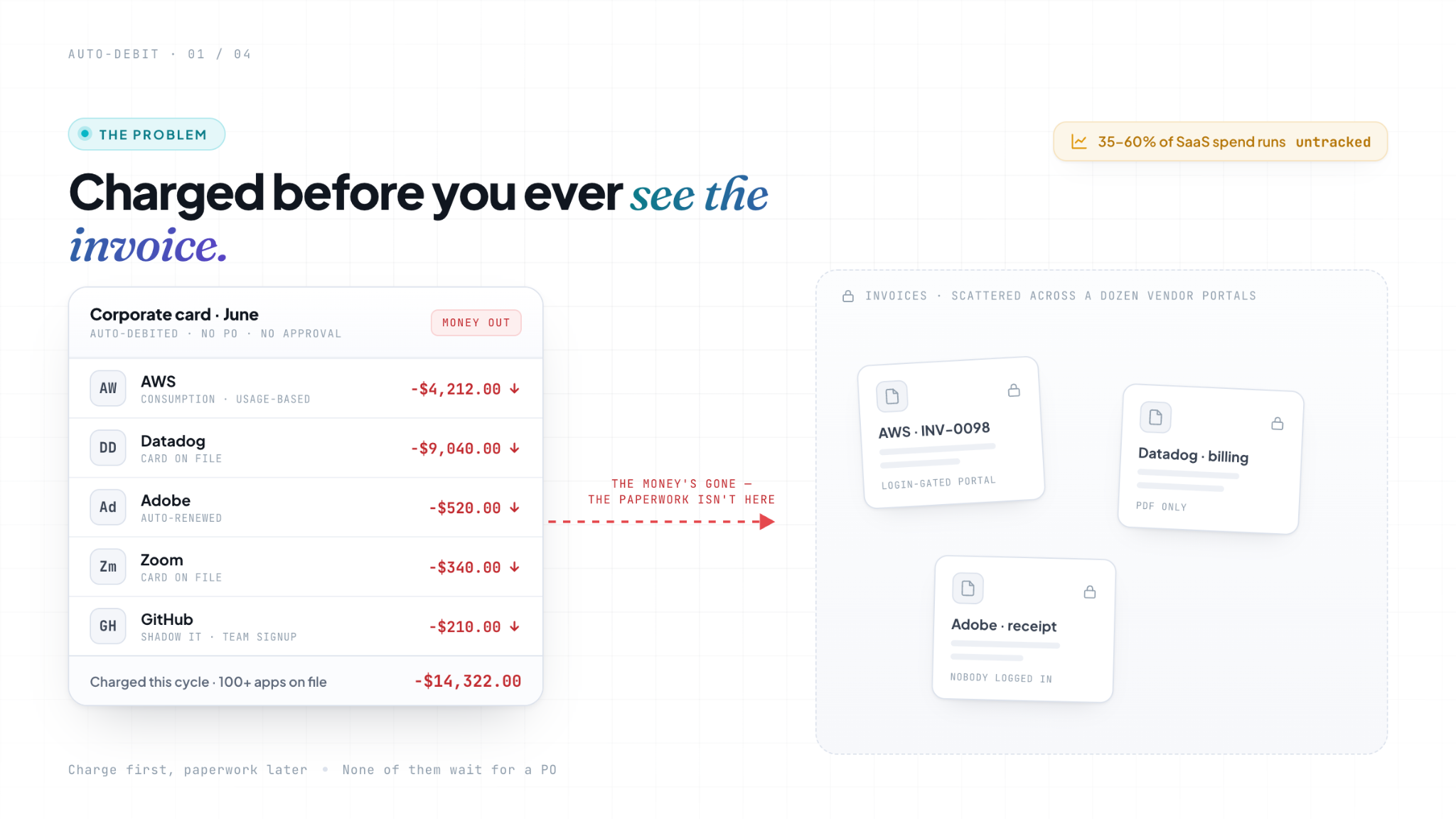
If you’re like most finance teams, the honest answer is “not all of them.” AWS already billed you for last month’s usage. Slack auto-renewed. Adobe, Zoom, GitHub, Datadog, all charged, all quietly, all before anyone in AP touched a thing. The money’s gone. The invoices are scattered across a dozen vendor portals nobody logged into.
That’s not a payment problem. It’s a visibility problem. And it’s the one most invoice automation quietly ignores, because by the time finance gets involved, the bill has already paid for itself.
Let’s fix that.
The bill that pays for itself before you see it
Auto-debit used to be a utility thing. Now it’s how you buy almost everything.
Your cloud providers: AWS, Google Cloud, Azure, bill on consumption and pull the money automatically. Your SaaS stack runs on a corporate card on file: Slack, Zoom, Adobe, GitHub, Datadog, and the long tail of tools individual teams signed up for. Your utilities and telcos are on autopay. None of these wait for a purchase order. None of them send the invoice to your AP inbox and wait politely to be paid. They charge first and leave the paperwork on a portal.
And there’s a lot of it. A recent analysis puts shadow IT, software the finance and IT teams don’t fully see, at roughly 35 to 40% of total SaaS spend for the median company, and as high as 60 to 70% for some.
The point is blunt: traditional corporate cards are the primary leak because they let recurring SaaS spend run untracked in the background. BetterCloud’s data shows that the average company runs over 100 SaaS apps, and around 70% of organizations admit to blowing past their cloud budget on spend they didn’t anticipate.
Then there’s consumption billing, which makes it worse. With usage-based pricing, cloud, plus the new wave of AI and data tools, you often can’t even predict the number before it hits. As Zylo notes in its 2026 SaaS Management Index, forecasting accuracy keeps declining the further you get from the contract signature. You’re not approving a known amount. You’re finding out after the fact.
Put simply: a growing share of your spend now arrives as a charge you didn’t initiate, for an amount you couldn’t predict, with an invoice you have to go find.
Why does this quietly wreck your close
Here’s the part that turns invisible spend into a month-end headache.
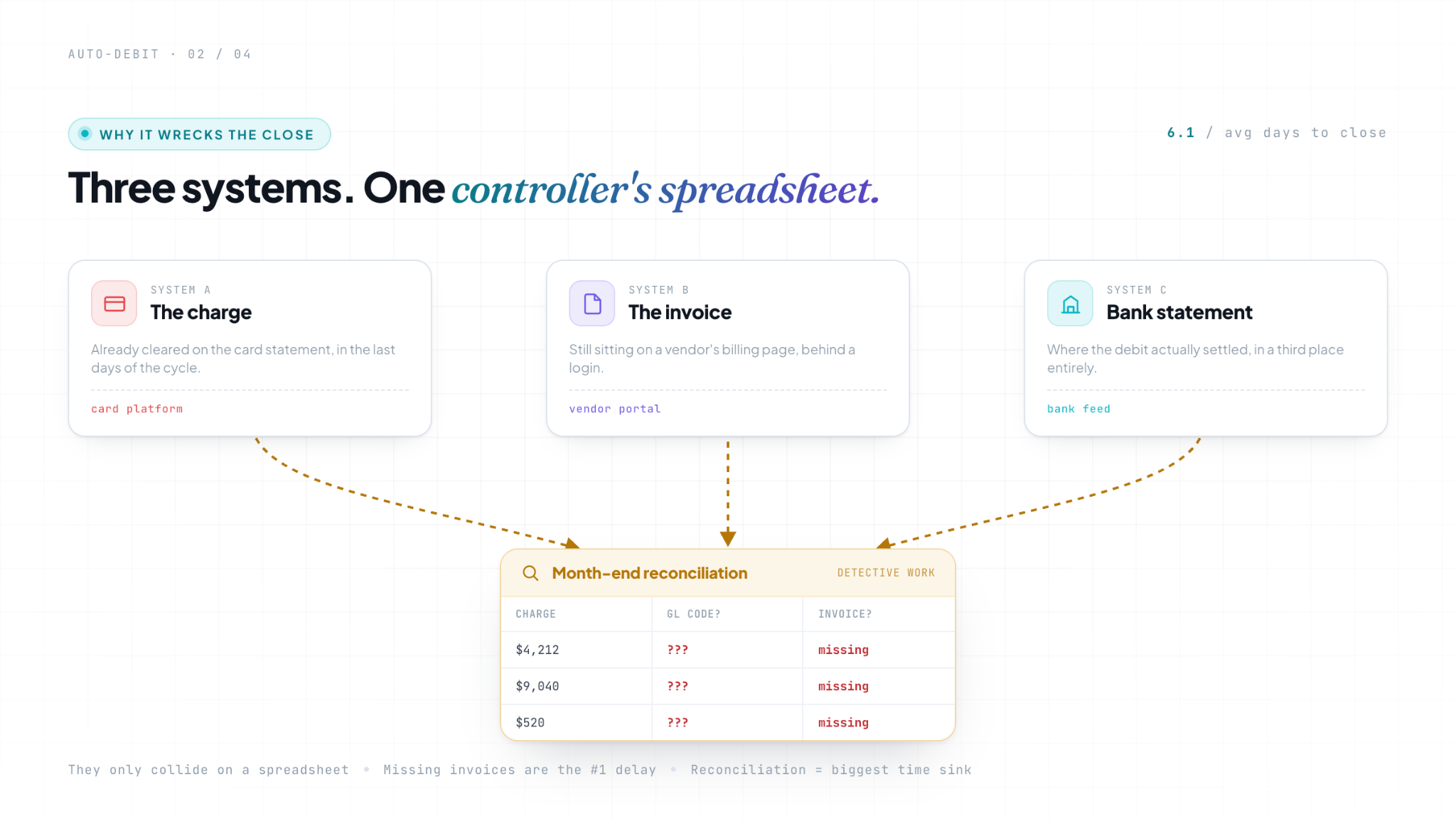
The charge almost always posts before the invoice is recorded. DATABASICS makes this point about card spend generally, and it’s doubly true for auto-debit: transactions land on the statement first, worst of all in the final days of the cycle, while the matching invoice is still sitting on a vendor’s billing page. So your books are perpetually one step behind the money.
And the reason it’s so painful to fix is structural. As Corpay puts it, the charge, the invoice, and the bank or card statement live in three separate systems that only collide on a controller’s spreadsheet at the end of the month. Reconciliation becomes a detective job: here’s a $4,212 charge from a cloud vendor, which project, which GL code, where’s the invoice that proves it?
That detective work has a cost. Half of finance teams need six or more business days to close the month, with reconciliation the single biggest time sink (Ledge’s 2025 benchmarks, via DATABASICS); APQC pegs the average month-end close at around 6.1 days. And the most common thing that drags it out? Missing invoices.
The deeper problem is control. When 40–60% of enterprise spend already originates outside formal financial workflows, and companies lose 10–20% of potential savings to maverick spend (Ivalua), every auto-debit that never makes it cleanly onto the books is a small hole in the hull. You can’t question a charge you can’t see. You can’t forecast cash against spend you haven’t recorded. Invisible spend is, by definition, uncontrollable spend.
Why this isn’t a “pay the invoice” problem
Most AP automation is built around a verb: pay. Capture the invoice, route it for approval, and release the payment.
Auto-debit breaks that model because the payment already happened. Nobody needs to approve it or release it; the vendor took the money days ago. The job that’s actually left is the boring, unglamorous, genuinely important one: capture the invoice, record it as already paid, and get it into your AP pipeline & your books.
It’s worth being clear about what this isn’t, because it gets confused with a few adjacent things:
It’s not expense management. There are no employee receipts here, no out-of-pocket reimbursements, no T&E reports. This is machine-to-machine: a vendor’s billing system charging your account on a schedule.
It’s not a SaaS spend tracker. Those tools are great at listing your subscriptions and flagging waste. But listing a charge isn’t the same as getting the invoice captured, marked paid, coded, and posted into your ERP and AP pipeline. A dashboard that says “you spend $9,000/month on Datadog” still leaves the actual accounting undone.
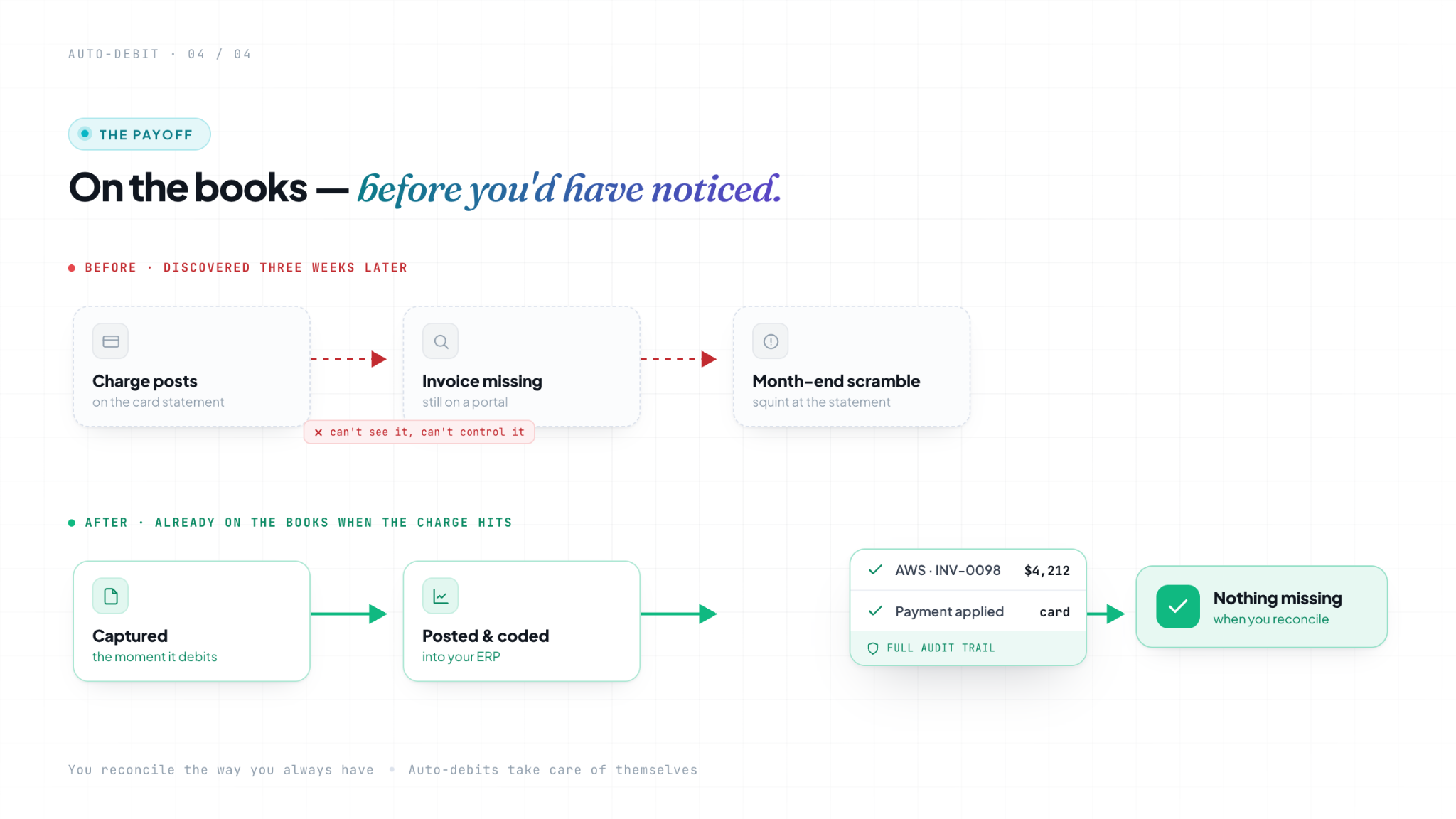
And it’s not reconciliation. This is the important one. Blackbee doesn’t match your auto-debits against your bank statement or run your month-end reconciliation for you; that stays wherever it lives today. What Blackbee does is make sure every auto-debit actually shows up, is captured and marked paid, in your AP pipeline and ERP in the first place. Reconciliation is a lot easier when nothing’s missing, and the reason it’s hard today is that these charges keep going missing.
What “on the books” has to mean here is specific: the invoice is captured, coded to the right account, and posted into your ERP and AP pipeline as an already-paid transaction, with an audit trail that holds up. Not just noticed on a dashboard, actually in the system your finance team works from.
The fix: capture it, record it as paid, get it into the pipeline
This is exactly the kind of workflow Blackbee AI is built for. Blackbee is the agentic Intake-to-Pay layer that sits above your ERP and governs spend from intent through payment, and now it connects to n8n, the workflow automation platform, so you can wire that control layer into the rest of your stack.
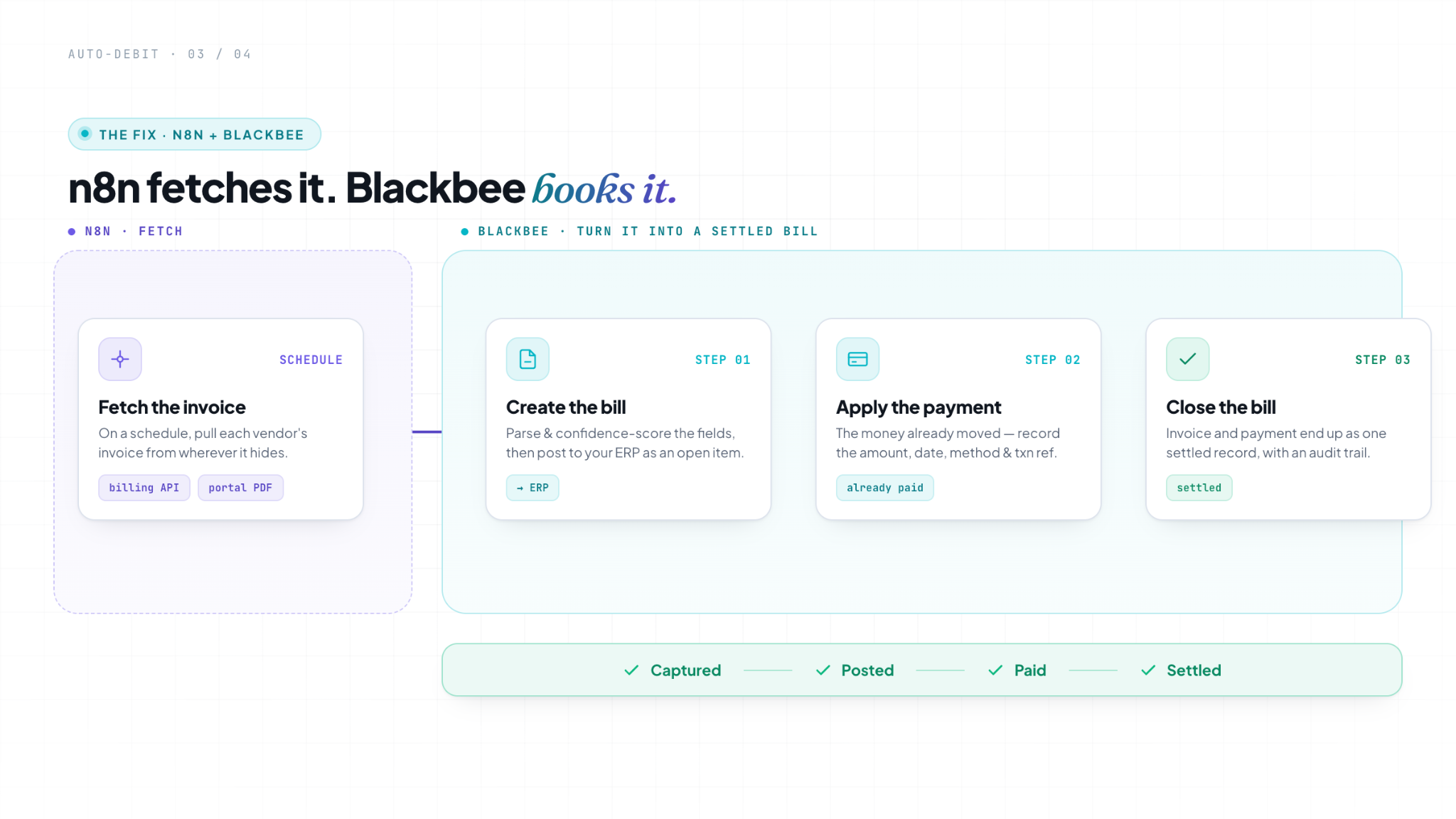
For auto-debit, the division of labor is clean: n8n goes and gets the invoice; Blackbee turns it into a bill, posts it to your ERP, applies the payment, and closes it out. Here’s the whole flow, end to end.
1. n8n fetches the invoice, structured data first, PDF when that’s all there is. On a schedule, n8n pulls each vendor’s invoice. Cloud providers and well-built SaaS expose a billing API, use that, it’s clean and already structured. For the stragglers that only post a PDF on a login-gated portal, n8n pulls the file instead. Either way, the invoice that’s been hiding on a portal finally enters a workflow.
2. Blackbee creates the bill, and posts it to your ERP. n8n hands the invoice to Blackbee. Structured data goes straight to the Create Bills API; a PDF goes to Upload Invoice, where Blackbee’s Parse Agent extracts and confidence-scores every field first. Either path creates the bill in your AP pipeline and posts it to your ERP as an open item, coded and visible, instead of invisible on a card statement.
3. Blackbee applies the payment, and closes the bill. Because the money already moved, the next step isn’t “pay,” it’s record what happened. Blackbee applies the payment details, the amount, the date the debit cleared, the method (card or ACH), and the transaction reference, closes the open bill, and posts the payment entry to your ERP. The invoice and its payment end up as one settled record.
The result is the thing every controller actually wants: the moment an auto-debit hits, the invoice behind it is captured, posted, paid, and settled in your ERP and AP pipeline, not discovered three weeks later when someone squints at the card statement. You reconcile the way you always have. The difference is there’s nothing missing when you do.
How to set this up in n8n
That’s the flow. Here’s how to actually build it. You can get your first vendor running in well under an hour, and once one works, the rest are mostly copy-paste.
Before you start, you’ll want:
- An n8n instance (cloud or self-hosted)
- A Blackbee AI account with the n8n integration enabled, and your Blackbee API key
- A way to reach the vendor’s invoice, a billing API or invoice email for cloud and major SaaS, or login credentials for portal-only vendors
Step 1: Connect Blackbee to n8n. Log into Blackbee and create an API key for n8n. Add the Blackbee node, save that key as your credential, and test the connection. You’ll reuse it across every vendor workflow.
Step 2: Add a Schedule Trigger. Daily is a sensible default for cloud and SaaS (0 7 * * * for 7 am); line it up just after your billing dates.
Step 3: Fetch the invoice. Two ways in, depending on the vendor. If they expose a billing API, generate an API key on the vendor portal and pull the invoice data on your schedule with an HTTP Request node, that gives you clean, structured data. If all they offer is a PDF behind a login, use an HTTP Request node against the portal to pull the file instead.
Step 4: Send it to Blackbee. Structured data goes to the Create Bills API, which creates the bill in Blackbee and posts it to your ERP in one move. A PDF goes to the Upload Invoice API, Blackbee parses the document, then creates the bill and posts it to your ERP. Either way the bill lands in your AP pipeline and your ERP as an open item; you don’t wire up a separate “push to ERP” node, the API handles it.
Step 5: Apply the payment. On successful posting, call the Apply Payment API with the settlement details, for example:
{
  "amount": 4212.00,
  "date": "2026-06-28",
  "method": "card",
  "txn_ref": "AWS-2026-06-INV-0098"
}
Blackbee applies the payment, closes the open bill, and posts the payment entry to your ERP, so the invoice and its payment live as one settled record.
Step 6: Add your exception branches. Route the unusual cases, a partial charge, a retried debit, a credit or refund, to a human (a Slack alert or a review queue) instead of recording them blindly.
Step 7: Test on one vendor, then activate. Run it manually against a single vendor first (cloud is the best place to start). Confirm the bill shows up in Blackbee, posts to your ERP as an open item, and closes out once the payment applies. Once it’s clean, switch the workflow on, then duplicate it for the next vendor and adjust the fetch step.
A quick note on labels: the exact API names, fields, and node config may differ slightly on your live Blackbee instance, check them in n8n and adjust.
Handling the messy parts (the exceptions)
Real billing is never as tidy as the happy path, and any honest version of this workflow has to deal with that.
Partial charges, failed debits, and mid-cycle credits. A card declines, and the vendor retries. A plan is prorated halfway through the month. A usage true-up lands as a separate line. A refund or credit shows up against a charge you already recorded. These shouldn’t be recorded blindly; flag them for a person so the same charge doesn’t get booked twice and a credit doesn’t get lost.
Reconciliation stays yours. Blackbee gets the transaction captured, marked paid, and into your ERP and AP pipeline; it doesn’t match it against your bank statement. That final tie-out stays in whatever tool or process you use for close. What changes is that the transaction is already there when you get to it, so reconciliation stops being a scavenger hunt.
An audit trail for every auto-paid line. Because the money left before anyone looked, the record matters more, not less. Every captured invoice and settlement detail should be logged, so when an auditor or your CFO asks “what was this charge, and where’s the proof?”, the answer is one click, not a half-day search.
Where to start
You don’t need to connect every vendor on day one.
Start with your biggest bill; for most teams, that’s cloud. AWS or Azure consumption charges are usually the largest, least predictable, and most painful to chase down by hand, which makes them the highest-value place to prove the workflow. Get that one flowing cleanly: fetched, recorded as paid, and posted into your ERP and pipeline. Then add your top card-billed SaaS tools, then the autopay utilities.
What changes by your next close is the whole point. Instead of hunting down invoices for charges that already cleared, you’ll walk into month-end with those transactions already captured, marked paid, and sitting in your ERP and AP pipeline, coded and ready. Nothing is missing when you reconcile. The auto-debits stop being the thing that holds up the close. They become the thing that takes care of itself.